Run the Kaypro II
Use the original Java emulator in a modern browser through CheerpJ.
Open the emulatorThe Kaypro II Project
Explore the Kaypro II through a restored browser emulator, original photographs, technical documentation, and resources for the CP/M computer community.
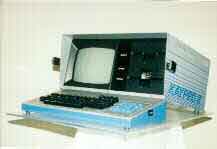
Explore the archive
Use the original Java emulator in a modern browser through CheerpJ.
Open the emulatorStudy photographs and animated views of the case and keyboard mechanism.
Explore the 3-D viewBrowse technical notes, brochures, presentation materials, and emulator documentation.
Browse documentationExamine two-dimensional views and original photographs of the Kaypro II.
Browse 2-D viewsContinue into the wider collection of Kaypro and CP/M community resources.
Visit Kaypro linksAccess the archived download page for the Kaypro II emulator project.
View downloadsProject history
In 1998 we were completing our Computer Science senior project. Java was becoming popular, Java Swing was a new technology, applets were becoming common and most of us were kids; some getting started in their careers, some who had not yet entered the workforce.
Time has a way of passing quickly - Java applets are a thing of the past, and I'm now retired and have long-since lost track of the rest of the group. One of my retirement goals was to get the 'ol Kaypro emulator up & running. With the help of AI and a few hours of hacking - it runs again! This effort is dedicated to the professor that pushed us, and the students that spent hours in my basement getting this project running.
The original CSI 426 project set out to emulate a Kaypro II computer in Java and make the machine accessible through the internet. On the last class before summer break, our professor, Dr. Howerton presented a list of computers. He divided us up into teams and asked each team to choose a computer. We selected the Kaypro. He told us that we were to use the summer to research the computer we selected, because our senior project would be to write an emulator in Java, and have it executed via a web interface. None of us had taken a Java programming class. When asked how we could be expected to do that without having a class, in a matter-of-fact voice, he said: “When you are in the industry you won’t always be asked to build software in a language you know. That’s the real world. You have the summer to learn Java.”
It's amazing what people are capable of – even kids. If we expect little, we will get little.
As for me, I took the summer researching the machine. I purchased one online and took it apart. I looked at the schematics and researched the components. I went so far as to extract the BIOS and character generator code. I managed to get Java up & running and wrote a prototype. I was interested in the CPU and hardware emulation so that is where I concentrated my efforts. This was the basis for the emulation.
We would meet once a week in my basement, and spent the rest of the week implementing what we divvied-up. When we first met, we had a rough proof of concept. That allowed us to create a design with more confidence. The class required that we go through formal design before we wrote any code. This is probably the only time in my career that this was permitted (required). We gathered the requirements and wrote the user guide first – followed by the design and test documentation. We had a little more than a month before the project was to be finished and no code (except the prototype) written. We took a break for the next week to go an write the code. Each person was given modules to write. The code was written directly from the design.
When we met again, Brandon, who created the GUI, was the integrator. We sat behind him as he took the code modules we delivered to him and tried to get the code to build. Surprisingly, we only had about ten issues. It took a few hours and the code compiled. To our surprise the code came up and ran! Unbelievable! We worked through a few minor issues, and we had a running emulation. We had a few weeks before it was due, so we published it on the web and collected reactions. To our surprise it was well accepted. Some of the reactions are in the documentation on the site.
Looking back, this was the way software should be designed. Interfaces were defined up-front; the entire team was involved. Everyone knew a lot about their section and a little about everyone else’s. This distributed method worked well. Looking back on my career, I remember so many times software teams had a single “hero.” Everyone supports that hero, so they become a critical path – both of resource and knowledge. In our team there were very few critical paths. We assigned modules to individuals with that particular skill and interest. We had great buy-in and knocked the project out of the ballpark. It was an experience I wish every software engineer had.
The work also gathered product brochures, photographs, technical information, and CP/M resources.
It was an amazing project and an amazing experience. I now have a chance to look-back after a lifetime in the computer industry. To anyone starting out on this path: put your apprehension aside. So many times we get bogged-down because we think a task is insurmountable. Focus on the large goal, but break the problem into smaller parts. Gather a team of like-minded individuals. Work together as a team. Choose a leader that is strong, but not full-of themselves. Leaders, support your team while you lead it. Don’t look down on those with less experience, but help to mentor them. Watch the team and support it where it is weak. To the rest of the team: Put your egos aside; ask questions when you don't understand. Don't be afraid to make mistakes - and learn from them.
Some day you will be like me, reflecting back over your career. Make it a great one! ~Joe Diethorn
The project was presented at the 1999 CCSC Rocky Mountain Regional Conference by Joe Diethorn and Shannon Steinmetz. Decades later, the emulator has been adapted to run again in current web browsers.
This archive does not buy, sell, or repair Kaypro computers. Owners looking for hardware help may find support through vintage computer communities and CP/M discussion groups.
Archive links: CP/M sites, CCSC, the 1999 presentation and slides
Email: kppr@yoy.org